New on Dropmark: Comments, info bar, and more

Announcements

Image

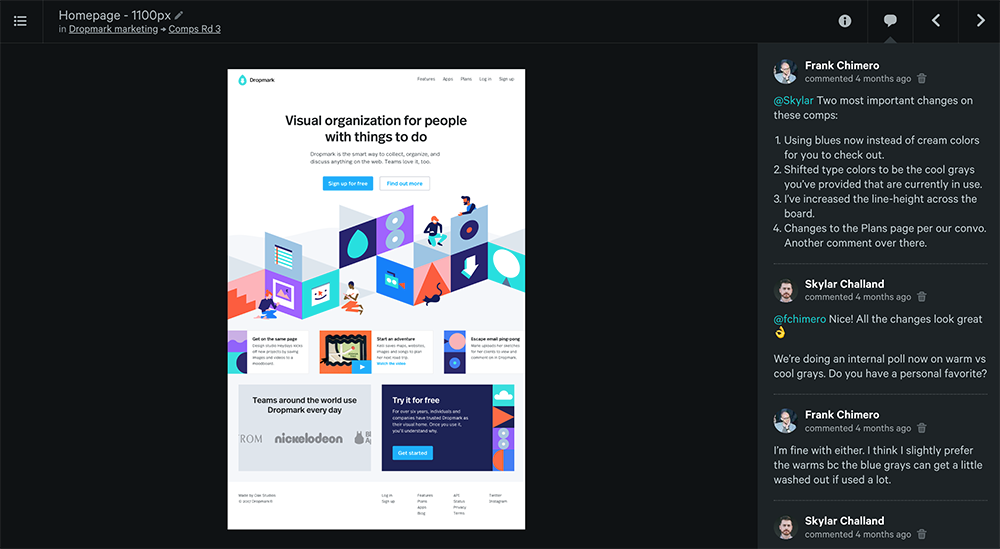
Collaborate better with comments

Collaborating with others just got easier with real-time comments. Now you can leave notes for your team and get feedback instantly. Comment on images, videos, websites—anything you can Dropmark, you can easily discuss. Collaborators are notified via e-mail so everyone’s in the loop.

This has been one of our most requested features, and we are thrilled to make it available today for all Pro users.

Say hello to the info bar

We are also excited to introduce an improvement to the item page we call the info bar, available right now for all users. The info bar gives you additional information on your items including source credits, image metadata, location information, and more. We’ve also made the download and link buttons clearer and easier to find.

Continue reading…

New dashboard features

Announcements

Today we are rolling out the new dashboard view for all users.

The dashboard introduces a new top-level overview of all your collections, new privacy settings, and a public view to share certain collections with the world. Read all about it on our blog post.

Along with today’s release, we are also excited to introduce two new dashboard features:

Quick upload

Image

Now you can quickly add items to any collection right from your dashboard, making it easier to keep your uploads organized. Drag and drop from your desktop or the web onto any collection stack, and your items will be uploaded on the spot.

Merge collections

Image

Easily merge all items from one collection into another. Just drag any collection stack from your dashboard, and drop it into the collection menu. All items from the first collection will be moved over to the second collection.

Introducing Dashboard view

Announcements

Image

Dropmark is all about organization. For those of you who have more than a few collections on the go, new features are coming to make your experience even better.

Dashboard view

The new dashboard gives you a top-level overview of all your collections. Preview item thumbnails, privacy settings, and get a quick overview of who else is collaborating on each collection. Pro users can even search, sort, and change thumbnail settings with the recently launched search bar.

New privacy settings

Dropmark collections are always private by default (viewable only by invited collaborators), with the option to set a collection to public (viewable by anyone you share the link with). Today we are introducing a new privacy setting we call “Everyone”, and making these settings much easier to view and change.

Public dashboard

Your new public dashboard lives at username.dropmark.com and shows any collections you wish to openly share with the world. To opt-in, choose the new “Everyone” privacy setting for each collection you wish to share (your existing collections will be unaffected). Pro users can also set up a custom domain name (ie. yourname.com).

These features will be rolled out to everyone on March 1st. Pro users have early access and can start using their new Dashboard today.

UPDATE: Dashboard is now available to all users, plus we are excited to introduce two new features!

New monthly pricing

Announcements

Today we are happy to introduce a new monthly pricing plan for Pro accounts.

Now you can get the full Dropmark experience for just $5 per month, less than the cost of your lunch.

Pro accounts include:

Yearly plans are available at $48/year (a 20% savings).

Sign up or upgrade today.

Getting organized in 2013

Announcements

Image

2012 was a big year for Dropmark. Since our launch in March, over one million items have been Dropmarked by smart and organized people like yourself. In September, we shipped our first native app for Mac, reaching #3 on the App Store’s Productivity charts. Every day we continue to refine and make Dropmark even better, and we couldn’t be more excited for what’s next.

Throughout the year Dropmark has gained praise from the likes of The Next Web and Lifehacker, but more importantly is the feedback from you, our dedicated users. We love learning how you use Dropmark as part of your daily workflow and hearing what you create with it. Drop us a line if you’d like to share your story, give us feedback, or have any questions.

Get the most out of Dropmark

As we enter the new year, now is the perfect time to get organized—but you don’t have to do it alone. Upgrade to Dropmark Pro before January 18th, and you’ll get a second Pro account free to give to a friend, co-worker, or fellow collaborator. It’s the perfect gift for someone who needs a little organization in their life.

As a Pro you’ll enjoy e-mail uploads, custom domain namessearch, sorting options, display options, priority support, and 25 GB storage. Try it out for 30 days and get a full refund if you’re not totally impressed.

Find out more at http://dropmark.com/pro

Introducing the search bar

Image

Today we are thrilled to announce new features to help you get organized in the new year: Introducing the search bar for Dropmark Pro.

The search bar brings a number of new tools to help improve your workflow and customize your collections:

Search

Quickly find specific items within your growing collections.

Sort

Sort your collections by name, date, or kind. Save your preferences and keep your content automatically organized.

Display options

Toggle item labels and customize your collections with square (default) or full (un-cropped) item thumbnails.


Pro users can find the new search bar icon next to the collection drop down. Keyboard shortcut fan? Tap the F key to toggle the search bar.

One million Dropmarks!

Announcements

Image

Today we hit a huge milestone: 1,000,000 Dropmarks!

In the roughly six months since our official launch, Dropmark users have added over one million images, videos, links, and more to their collections.

A huge thank you to our dedicated users!

In the past few months, we’ve been dedicated to making Dropmark faster and even easier to use. We’ve launched Dropmark for Mac, new features like custom domains and e-mail uploads for Pro users, and have more exciting updates planned soon.

Subscribe to our blog and follow @dropmark to keep in touch.

Another milestone

Yesterday’s launch of Dropmark for Mac resulted in another (unexpected) milestone.

After just a few hours in the Mac App Store, Dropmark made it to the #3 spot on Apple’s top 10 free productivity apps! If you haven't downloaded it yet, head over to the Mac App Store to download it for free.

Introducing Dropmark for Mac

Image

We are excited to announce the arrival of Dropmark for Mac!

Now you can Dropmark even faster and easier, right from your desktop. No need to open a web browser, just drag and drop to your menu bar and your content is sent right to your collection.

Upload files, entire folders, and even share content from the web and other Mac apps (like iPhoto and Mail).

Download it from the Mac App Store for free (requires OS X 10.7 Lion or later):

Download Dropmark from the Mac App Store

Thanks to all our beta testers for helping us get here. We hope you find it as useful as we do.

Dropmark just got faster!

Announcements

In the past few months since our launch, Dropmark’s user base has grown tremendously. To keep up with the growth, we decided to take a momentary step back from launching new features to focus on architecture.

Today we’re thrilled to launch a much faster Dropmark (just in time for the 100m dash). You should notice your collections are much snappier, loading up to 10x faster in some cases.

And that’s not all, we are continuing to improve and optimize (to the millisecond) so you can collaborate faster and get even more done.

Enjoy!

Stay up-to-date with Feeds

Announcements

Image

Today we are excited to announce integration with one of our favorite Mac apps: Feeds.

Feeds runs in your desktop menu bar and keeps you updated with web services like Basecamp, Github, Dribbble, and more. Now with Dropmark support, you can stay up-to-date with all of your important information in one place.

Image

Feeds will notify you of incoming collection invites, items from your collaborators, and even allows you to quickly preview contents without having to open a browser window or e-mail. With optional keyboard shortcuts and desktop notifications, you can be productive and informed at the same time.

Continue reading…